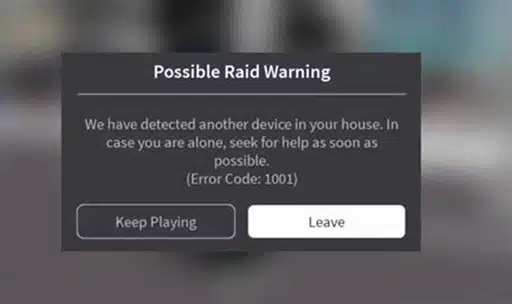

The famous horror-game “detected another device” message is not a real Roblox system error 1001 — it’s a scripted scare built into certain user-created experiences.
Roblox Error Code 1001 — Complete Fix Guide
Everything you need to know — what it really means, step-by-step fixes for all platforms, expert tips & Google’s top FAQs answered.
ℹ️
Quick Facts
Error Code 1001 appears in two distinct contexts: (1) as a scripted in-game horror message that is NOT a real system error, and (2) as a genuine network/connection error some players hit during login or gameplay. This guide covers both with expert fixes.
🔍 What Is Roblox Error Code 1001?
Roblox Error Code 1001 has two completely different identities in the gaming community — which is the root cause of all the confusion surrounding it.
Also Read : Google Internal Server Error Today : How to Fix
🎭 Real vs. Fake — Know the Difference
The viral spread began in 2022 when a community wiki post described Error Code 1001 as a terrifying system alert. Roblox’s official documentation does not list it as a platform error. Use these checks to identify which type you’re seeing:
🚨
It’s an In-Game Scare IF…
- You were playing a horror/mystery game (e.g. Start Survey, Doors)
- The message mentions intruders, 911, or surveillance language
- Leaving the game removes the message completely
- No other Roblox features are affected
⚠️
It’s a Real Connection Error IF…
- You cannot log in or load any game at all
- The error appears on the Roblox loading/splash screen
- Restarting Roblox does not clear the message
- Other apps on your device also show network issues
⚙️ Common Causes at a Glance
🛠️ Step-by-Step Fix Guide (All Platforms)
⏱️
Time Estimate
Most players resolve Error Code 1001 in under 15 minutes. Work through steps in order — stop when the error clears.
Check if It’s a Scripted In-Game Error
If you were inside a horror/mystery experience, press Esc → Leave. If the message disappears, it was part of the game — no action needed. Close and reopen Roblox to start a fresh session.
Check Roblox Server Status
Before changing any settings, visit status.roblox.com or check @Roblox on X (Twitter). If servers are down, wait 15–30 minutes — no local fix will help during an outage.
Restart Your Router & Test Internet Speed
Unplug your router for 30 seconds, then plug back in. Test speed at fast.com — Roblox needs at least 4–8 Mbps. If on Wi-Fi, try moving closer or switching to a wired Ethernet cable for a more stable connection.
Clear Roblox Cache Files
Windows: Press Win+R, type %temp%, delete all Roblox files. Mac: Library → Caches → delete Roblox folder. Mobile: Settings → Apps → Roblox → Clear Cache.
Update the Roblox App
Mobile: Open Google Play / App Store → search “Roblox” → tap Update. PC: Roblox usually auto-updates on launch. If not, reinstall from roblox.com/download. Running an old version causes server incompatibility.
Temporarily Disable Firewall / Antivirus
Windows: Settings → Windows Security → Firewall → Turn Off temporarily. Launch Roblox. If it works, add Roblox as a permanent firewall exception, then re-enable protection. Never leave your firewall off permanently.
Flush DNS Cache (Advanced — PC)
Open Command Prompt as Administrator and run these commands one by one:
ipconfig /flushdns →
ipconfig /release →
ipconfig /renew
Restart your PC afterward.
Disable VPN (If Active)
VPNs frequently interfere with Roblox connection routing. Turn off your VPN completely and re-launch Roblox. If the game loads, you’ve found the issue. Add Roblox to your VPN’s split-tunneling exclusion list to prevent future conflicts.
Switch Networks or Use Mobile Hotspot
School, office, and public Wi-Fi often block Roblox ports. Switch to home broadband or create a mobile hotspot from your phone. If Roblox loads on the hotspot, your original network is blocking Roblox traffic — contact your network admin.
Reinstall Roblox Completely
Windows: Control Panel → Uninstall Roblox → also delete %localappdata%\Roblox → download fresh from roblox.com. Mobile: Long-press icon → Uninstall → re-download from your app store. This replaces all corrupted installation files.
💡 Expert Tips & Pro Tricks
Always confirm Roblox server status before spending time troubleshooting your local setup. If there’s an outage, nothing you do locally will help. Save yourself 20 minutes — visit status.roblox.com first, every single time.
If you frequently get connection errors, a dedicated gaming network optimizer like ExitLag or Mudfish optimizes your routing path to Roblox servers, reduces packet loss, and prevents errors like 1001 caused by unstable routing.
Overly restricted account settings can block joining certain servers — which may appear as a vague connection error. Check Roblox Account Settings → Privacy and ensure restrictions match the games you want to access.
The famous message is a 100% harmless scripted scare built into horror Roblox games like Start Survey. It first went viral in 2022. It is not a security alert, not from Roblox, and requires zero technical action — just leave the game.
| ✓ Confirmed real error vs in-game script | ✓ Disabled VPN if active |
| ✓ Checked Roblox server status page | ✓ Flushed DNS cache (PC users) |
| ✓ Restarted router & tested internet speed | ✓ Tried mobile hotspot to isolate network |
| ✓ Cleared Roblox cache files | ✓ Reinstalled Roblox as last resort |
| ✓ Updated Roblox to latest version | ✓ Checked parental/account restrictions |
| ✓ Disabled firewall/antivirus temporarily | ✓ Contacted Roblox support if all else fails |
📱 Platform Comparison Table
❓ FAQs — Answered
📞 When to Contact Roblox Support
If you’ve worked through all 10 steps and still see the error, contact Roblox support. Include this information in your ticket for faster resolution:
🔗
Official Roblox Support Links
- Submit a ticket: roblox.com/support
- Server status: status.roblox.com
- Community help: devforum.roblox.com
- Official Twitter/X: @Roblox
Still Stuck? Leave a Comment Below!
Tell us your platform, what you’ve tried, and what the error looks like — our community will help troubleshoot your exact situation.


Pingback: Consorsbank Error | How to Fix - Tech Tips, Guides and Support