
Estimated reading time: 4 minutes
Getting kicked from a server with a cryptic message like “RPC Error in DoPlace” is one of the most frustrating ways to end a Rust session.
It usually happens right when you’re trying to expand your base or place a critical deployable, resulting in an instant disconnect.
This blog post breaks down why this happens, how to fix it, and how to prevent it from ruining your next wipe.
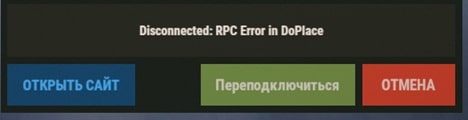
Understanding “RPC Error in DoPlace”
In technical terms, RPC stands for Remote Procedure Call. It is the way your Rust client (your computer) tells the server, “Hey, I’m placing this object right here.”
The “DoPlace” error specifically occurs when the server receives your request to place an item (like a sleeping bag, furnace, or wall) but finds something “illegal” or logically impossible about that request. Instead of just blocking the placement, the server’s security or logic layer “panics” and kicks you to prevent a potential exploit or data desync.
Common Causes
- Zone Restrictions: Trying to place items in “No Build” or “No Deploy” zones (common on modded servers with ZoneManager).
- Version Mismatch: Your game client and the server are running slightly different versions of Rust.
- Corrupted Logic: A plugin on the server (like a stack-size modifier or building blocker) is conflicting with the base game logic.
- Client Desync: Your character thinks it’s in one spot, but the server thinks you’re somewhere else, making the “placement” look like a hack.
Also Read : Xbox 360 Error Code 807B0193 | Easy Fix
Troubleshooting Steps
Step 1: The “Soft” Reset
Before diving into files, try the basics:
- Reconnect: Sometimes it’s a one-time packet loss issue.
- Try a Different Spot: If it happens in one specific corner of your base, the terrain or a nearby deployable might be causing a “clipping” error.
- Clear Your Inventory: Occasionally, a “ghost item” in your inventory causes the RPC to fail. Move your items to a box and take them back out.
Step 2: Verify Game Files (The Gold Standard)
If the error persists across different servers, your local files might be the problem.
- Open Steam > Right-click Rust.
- Select Properties > Installed Files.
- Click Verify integrity of game files.
Step 3: Clear Cache and Temp Folders
Rust stores temporary map and server data that can get “stale.”
- Navigate to your Rust installation folder (usually
SteamApps\common\Rust). - Delete the
mapsandcfgfolders. (Note: This will reset your keybinds/settings, so back them up if needed!) - Relaunch the game.
Step 4: Server-Side Fixes (For Admins)
If you are the server owner and your players are getting this error:
- Update Everything: Ensure your server build and Oxide/uMod are fully updated.
- Check Plugins: Disable plugins like ZoneManager, BuildingBlock, or NoDeploy one by one to find the culprit.
- Entity Kill Fix: If using ZoneManager, ensure you are using the
NextTickfix for entity kills to avoid NullReferenceExceptions during placement.
Expert Pro-Tip
If you’re playing on a modded server and this happens, check the server’s Discord. Most of the time, “RPC Error in DoPlace” is a known issue caused by a recent Rust update breaking a specific server plugin. If it’s happening to everyone, the admin just needs to update their Oxide build!
Frequently Asked Questions (FAQ)
A: No. An RPC error is a technical disconnect, not a ban. However, if you repeatedly trigger it, some anti-cheat plugins might temporarily flag you for “suspicious activity.”
A: Sleeping bags have specific “deployment” logic. If a server has a “Max Bags” limit or a “No Deploy” zone, the server might kick you for “DoPlace” instead of showing a “You can’t build here” message.
A: Yes. If your ping is high, your “Place” command might reach the server after you’ve already moved away from the spot, causing a “distance violation” that triggers the RPC kick.


Pingback: Xero Error Code 500 | How to Fix - Tech Tips, Guides and Support
Pingback: HBL Error Code 503 | What the Error Means - Tech Tips, Guides and Support